9. Drill Down PS Query in Peoplesoft

Purpose of Drill Down Query:

  • Wouldn't it be nice if they could just click on a hyperlink embedded within the query results and have the page pop up in a separate browser window instead?

  • As a solution to this kind of situation we need to use Drill down PS query instead of Normal.

  • It is a special type of expression which will return the respective URL for the column along with the PS Query Search Results. 
Types:

1. Query URL
·         Select Query URL if you want your URL to point to a different query result.
·         By clicking hyperlink in search result it will execute the child query(Based on the mapped field in search result).
 2. Component URL
·         Select Component URL if you want to open up a transaction page.
·         By clicking hyperlink in search result it will redirect us to the respective transaction page.
3. External URL
·         Select External URL if you want to open up an external page like Google.
·         By clicking hyperlink in search result it will redirect us to the external page in a new tab.
4. Attachment URL
·         Select Attachment URL if you want to open up an attachment by clicking on the link.
5. Free form URL
·         Select Free Form URL to create your own type of URL

Step by Step Instruction to Setup the Drill down URL:
Step 1:
·         Once the query is created, Click Expression -> Add Expression Button.


step 2:
·         Select the expression type as Drilling URL.

step 3:
  • Once Drilling URL is selected as the Expression type, their types will be highlighted.
  •  Choose anyone URL type based on the requirement.  

step 4:
  • After all the fields were entered, click the search keys button to populate all the search keys which is in our record.

step 5:
  • If search keys are populated, then give their respective key value. The Selection flag for the particular field name should be selected to fill their key values.
  •  These values will be used to By-pass the search key values while the component is redirected.

step 6:
  • Click the Map column button to populate all the fields from the query record.
  • Select the field that needs to be mapped. While the query the executed, on clicking a mapped field the component will be redirected in a separate tab in our browser.

step 7:
  • “Use as field” hyperlink will be used to make the drilling URL expression as a new field and it will store in the database(optional).

  • Drilling URL field will be added along with the Query search results.

step 8:
  • Click the mapped fields or drilling URL hyperlink to redirecting the respective component in a new tab in our browser.


8. PeopleSoft Search Framework

PeopleSoft Search Framework:

# The PeopleSoft Search Framework consists of PeopleSoft components (pages and records provided by PeopleTools), which provide a centralized interface for configuring PeopleSoft integration with the search engine, creating search artifacts like search definitions, search categories, and building and maintaining search indexes. Currently the PeopleSoft Search Framework supports only Oracle Secure Enterprise Search (SES) as the back-end search engine.
Some of the key features are:
§  Search Administration interface provides a familiar PeopleSoft browser interface enabling you to: configure search engine connectivity, deploy search definitions, schedule index creation and maintenance, and run incremental index updates.

§  Search Designer interface, provides a familiar PeopleSoft browser interface enabling you to: create search definitions, create search categories, define title and summary result display (similar to Google search results).

§  Flexible security: indexes can be created with source-level security, document-level security, or no security. Oracle SES allows for fully authenticated and authorized search queries.

§  Search Query API enabling rich display options, such as filtering.

# The PeopleSoft database stores the PeopleSoft queries that define the search data as well as the search definition Meta data. Oracle Secure Enterprise Search stores the deployed search definitions and performs the typical search engine tasks, such as building indexes, crawling for updates, maintaining indexes, and servicing end-user search requests.

 Relation between Oracle Secure Enterprise search and PeopleSoft Search Framework:

# Oracle Secure Enterprise Search (SES) provides a familiar user interface to internet search users and gives secure access to all of your organization’s data sources—Web sites, file servers, content management systems, enterprise resource planning and customer relationship management systems, business intelligence systems, and databases.

# Oracle has created an embedded framework in PeopleSoft to integrate and communicate with SES, called PeopleSoft Search Frame Work.

# PeopleSoft Search Framework is a People Tools 8.52 indexed search technology that relies on Oracle SES (Secure Enterprise Search) engine by way of Integration Broker.

# Integration Broker provides the interface between PeopleSoft Search Framework and Oracle   SES engine to deploy the search definitions, build the indexes, and return the search results.

#  PeopleSoft Search Frame Work leverages indexes, and requires the use of PeopleSoft Query or Connected Query to create search definitions that identify the objects and attributes to make available to the indexes. 

# PeopleSoft Search Framework supports both application (global) and search pages (component) search capabilities. 

# Application search provides an alternate navigation mechanism that bypasses the classic PeopleSoft navigation.

# The Search Pages feature allows keyword-based searches within administrative components.

# Both searches target the PeopleSoft pages and components as if you navigated directly to them, while providing flexibility in searching. Users can choose to display the search results in list or grid format.

# As the Data is secured, so that search results return only data rows to which the user has role and permission list access


6. Event execution

How EVENTS executed defaultly in peoplesoft?
   
In following order the events in peoplesoft executed generally,

Events order:

1.Search Init 
2. Search save 
3. Row select(search mode)/Field default(add mode) 
4.Pre Build 
5.Row Init 
6.Post Build 
7. Page activate 
8.Field edit 
9.field change 
10. field formula 
11. Row insert 
12. row delete 
13. pre pop-up 
14. save edit 
15.save prechange 
16. work flow 
17. save post change

5. How to insert a prompt table in peoplesoft record?

How to insert a prompt table in peoplesoft record?


step 1:
select the field in record where do you want to insert a prompt table.


step 2:

Right click the field and select the record field properties.


step 3:
In Record field properties click the EDIT button.


step 4:

In edit click the TABLE EDIT in edit type and choose "prompt table with no edit"

*choose the necessory prompt table in below option


step 5:

Then check in page whether the field get changed like the below picture.


step 6:

Then come to the front end and check the field which has the prompt table.


step 7:

Then click the prompt table icon near the field to choose the needed data.


*don't forget to save the action continously.


4. Error - More than one data record in scroll ???


Re: More than one data record in scroll ???

 I'm getting this error in app designer and am unsure what it means....

 More than one data record in scroll -- make fields from non-primary
 record related display: CSH_OFF_RCPT_T.TENDER_KEY. (15,22)


Explanation:

 A scroll bar can only contain data from one data record.

 You may access other records within the scroll, provided that they are
 related display fields. (Related display fields will not be updated as
 part of Save processing.)

To correct this problem, reorder the fields

 so multiple records are not under one scroll, or, if multiple records
 are required under a scroll, make fields from records other than the primary one non-updatable related display fields.

It means you have two records contained on one scroll level. You can only
have one table/view record per scroll, per page. You can retrieve other
data from other records and make them related display fields that are based
on fields within your main record, but they are then display-only. Either
that or you will need to move one of the records to a different scroll level
if that's possible depending on your key structure.

I suppose you could

create a secondary page with your second record on it and link to that page
from this page as well. 


3. Introduction to Peoplesoft(PPT)

Here i have attached some power point related with the peoplesoft especially for the beginner....

Introduction to peoplesoft appdesigner(ppt)
http://www.scribd.com/doc/104264086/peoplesoft-App-Designer

Component interface in peoplesoft(ppt)
http://www.scribd.com/doc/104264174/Component-Interface-in-peoplesoft

Configuration manager in peoplesoft(ppt)
http://www.scribd.com/doc/104264185/Configuration-Manager-in-peoplesoft

Introduction to peoplesoft v1.0(ppt)
http://www.scribd.com/doc/104264231/Introduction-to-PeopleSoft-v1-0

Oracle peoplesoft know your work better v1.0(ppt)
http://www.scribd.com/doc/104264287/Oracle-PeopleSoft-Know-Your-Work-Better-v1-0

people code(ppt)
http://www.scribd.com/doc/104265148/People-Code

peoplesoft security definitions(ppt)
http://www.scribd.com/doc/104265168/PeopleSoft-Security-Definitions

peoplesoft internet architecture(ppt)
http://www.scribd.com/doc/104265159/PeopleSoft-Internet-Architecture-PIA

2. How to upload and download a pdf file in oracle database?

how to upload and download a pdf file in oracle database?


here i have some procedures to upload and download a pdf file in oracle type database


a) Follow the below steps for uploading a pdf file into a oracle table as blob data type.

step 1.

-- assume the PDF files are in /data/documents filesystem directory

create or replace directory pdfdir as 'D:\pdf';
grant read on directory pdfdir to <USERNAME>;

step 2.

create table mydocs (id integer primary key, doc blob);

step 3.

declare
bf bfile;
b blob;
src_offset integer := 1;
dest_offset integer := 1;
begin
-- insert a new blob and return it to local variable
insert into mydocs values(1, empty_blob()) returning doc into b;
-- open the bfile for file "summary.pdf"
bf := bfilename('PDFDIR', 'test.pdf');
dbms_lob.open(bf, dbms_lob.file_readonly);
dbms_lob.loadBlobFromFile(b, bf, dbms_lob.lobmaxsize, dest_offset, src_offset);
commit;
end;

Once after performing the above. The pdf content will be available in the table mydocs.

b) Follow the below steps for downloading the blob data type contents as a pdf file.

step 1:

SQL> CREATE OR REPLACE DIRECTORY BLOBS AS 'd:/pdf/';

Directory created.

step 2:

DECLARE
l_file UTL_FILE.FILE_TYPE;
l_buffer RAW(32767);
l_amount BINARY_INTEGER := 32767;
l_pos INTEGER := 1;
l_blob BLOB;
l_blob_len INTEGER;
BEGIN
-- Get LOB locator
SELECT doc
INTO l_blob
FROM mydocs
WHERE rownum = 1;

l_blob_len := DBMS_LOB.getlength(l_blob);

-- Open the destination file.
l_file := UTL_FILE.fopen('BLOBS','MyImage.pdf','WB', 32767);

-- Read chunks of the BLOB and write them to the file
-- until complete.
WHILE l_pos < l_blob_len LOOP
DBMS_LOB.read(l_blob, l_amount, l_pos, l_buffer);
UTL_FILE.put_raw(l_file, l_buffer, TRUE);
l_pos := l_pos + l_amount;
END LOOP;

-- Close the file.
UTL_FILE.fclose(l_file);

EXCEPTION
WHEN OTHERS THEN
-- Close the file if something goes wrong.
IF UTL_FILE.is_open(l_file) THEN
UTL_FILE.fclose(l_file);
END IF;
RAISE;
END;
/

https://forums.oracle.com/forums/thread.jspa?messageID=10481109&#10481109

1. Popup menu creation in peoplesoft

How to create a popup menu in oracle peoplesoft?

The common way to create a popup menu in peoplesoft is as follows,


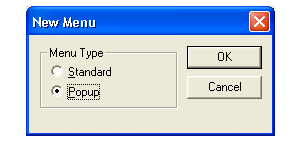
                                            Create new menu as follows.

Select popup option.-


Click on define transfer.


Assign  any menu, component, page (comp item), click the check box at bottom.
Click ok then save the menu.


Then  put name of popup menu in any page field properties popup menu option.


Open this page in PIA and click on arrow symbol.
It will take you to menu , component ,page define in transfer properties of popupmenu.